Run one focused Google or Meta task in your browser. The agent prepares campaign files, research tables and creative briefs from public sources and the material you give it. You review the result and decide what reaches your account.
✓Public research + your own files✓Never touches your ad account✓Pay as you go
Runs in your browser. You stay in control.
For media buyers and strategists who can review the output and put it to use. Everything runs inside Tegra, with nothing to install.
You bring the product page, product facts or account exports the task asks for. You get campaign files, research or creative briefs for review. You decide the final claims, the imports and every account change.
Each task shows its estimated cost before you start. You pay for what you use, and image rendering is only charged when you ask for it.
Two agents. Pick your channel.
See what each agent prepares, what it needs from you and what it costs.
See real Meta copy from a run, how it was reviewed and the finished image, then compare the file formats. What your own run can produce depends on the inputs you bring.
A real Meta draft, from copy to finished image.
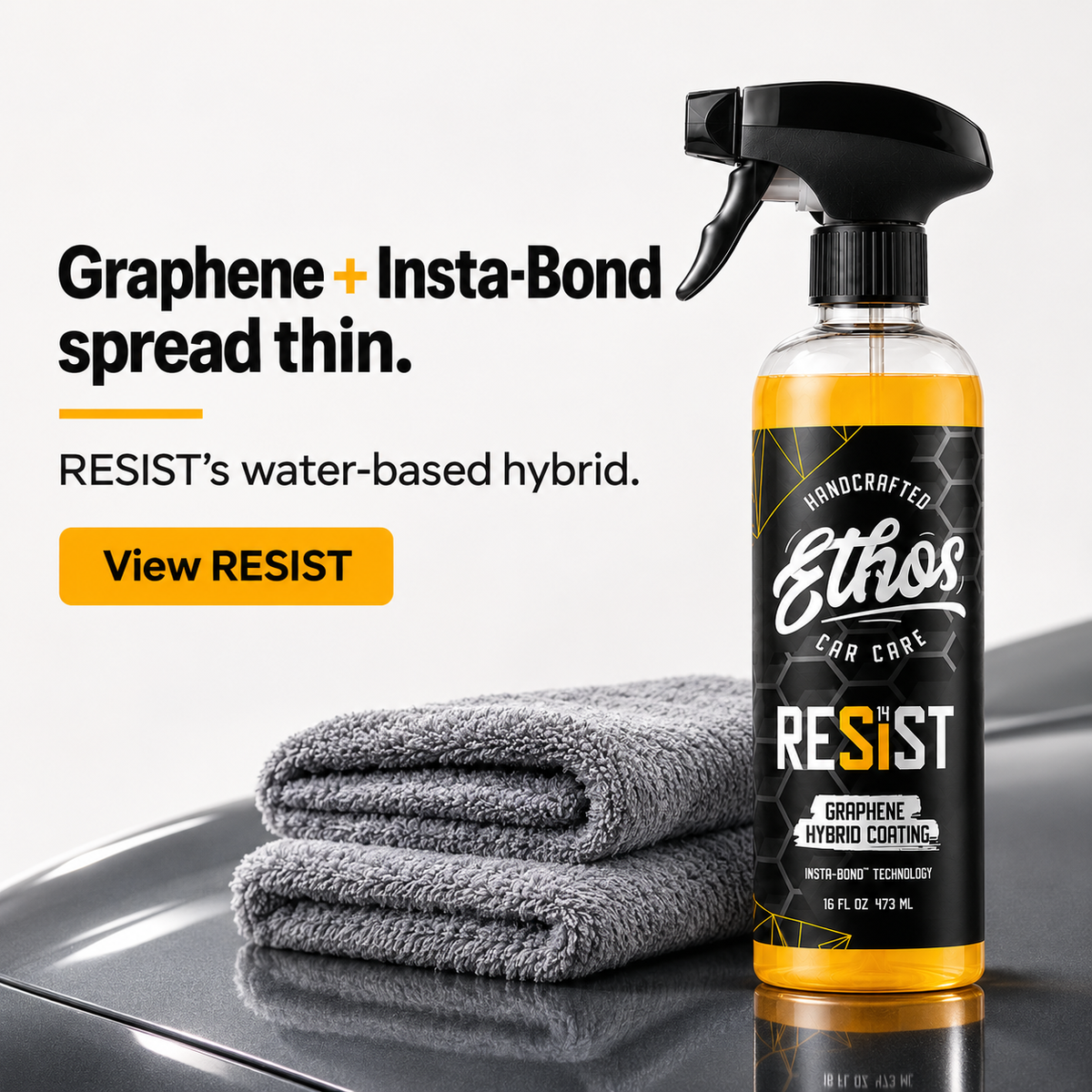
Our team ran the agent on the RESIST product page. It wrote five drafts and revised them after its own review. Two passed the final copy check and three were held back as too similar. One of the two became this finished image.
The agent’s own render, from two product photographs we supplied. A draft, not a launched ad. Download the original to check the packaging and type.
Two drafts from the run · 6 November 2026
Angle
Primary text
Headline and description
Composition made concrete
Two sprays on a cool, clean panel. Inside RESIST's water-based hybrid: graphene-infused ceramic, reactive curing and Insta-Bond technology. Ethos names the composition; the application starts with a thin spread.
Graphene + Insta-Bond, spread thin.
RESIST's water-based hybrid.
What follows the buff
The towel leaves the panel; RESIST's curing step follows. Ethos describes reactive curing in air after buffing and names Insta-Bond technology in its water-based graphene-infused ceramic hybrid.
Buff RESIST. Then it cures in air.
Ethos's reactive-cure claim.
The full CSV has all five drafts, each with its text, headline and description. Every row is marked “Draft - not launched.”
See the full review
The final check passed 2 drafts and failed 3. It judges how distinct each draft is and also checks for banned phrases and AI-sounding writing. The download includes the failed drafts and why they failed.
The image above was rendered later, on request, from the first draft. The render dropped a comma from the headline and changed an apostrophe, which would need fixing before use.
Nothing was launched or tested, and there are no performance results. This file is a one-off for the demonstration, separate from the standard copy file shown below.
Source: Runs by our team · prompt version 1.3.0 · The agent’s unedited copy and image, shown as a compressed preview. All five drafts and the review are in the download. Not a launched ad, not a campaign result and not output from the licensed system.
See an earlier Meta research run
An earlier Meta research run
A run by our team turned a public product page into a likely audience, a proposed angle and a production format. It also noted what it could not find proof for.
Selected output · 19 October 2026
Field
Excerpt
Likely audience
You want a black everyday sneaker for casual walks in warmer weather.
Proposed angle
The warm-weather black sneaker
Production format
4:5, 1080 × 1350
What it could not find
no authenticated customer verbatims
See a line the agent rejected
Rejected line:Cooler than your leather sneakers.
Reason: no comparative temperature or breathability test.
Why it kept this angle: It makes a concrete material fact relevant to a specific wardrobe decision without claiming black shoes are inherently hotter.
Source: Run by our team · prompt version 1.2.0 · Identifiers removed. The personas and angles are the agent’s own proposals; no verified customer quotes were available for this run.
A real Google Search build, start to finish.
Our team ran the agent on a real product page. It returned six CSV files: one campaign, two ad groups and four responsive Search ads. Download them and check the wording, the settings and what the validator found.
Import validation: PASS0 errors · 7 advisory warningsReady for review · everything set to Paused
This demonstration used product facts we supplied. The $50/day budget and $25 target CPA are examples, and the keywords and negatives still need validating. Everything is set to Paused. The agent did not access an ad account or launch a campaign.
What did the validator flag?
We asked for two ads per group, one fewer than the recommended three. The other warnings cover short headlines, a truncated description and a reused headline. All seven are in the download.
Source: Run by our team · prompt version 1.4.0 · The agent’s unedited output, with private identifiers removed. A demonstration from supplied product facts: not launch-ready, not a client result and not output from the licensed system.
Google · Paused Search campaign package
Supply a product page, market, keywords, budget and economics. The builder prepares the campaign files and tells you what its checks found. You review the files and the import preview.
Search builder · the main files you get
File
What to check
search-campaigns.csv
Paused status, budget, bidding target and whether the margins work
search-ad-groups.csv
Intent grouping and the requested campaign scope
search-keywords.csv
Match types, where each keyword came from and the CPC you can afford
search-responsive-search-ads.csv
Claims, landing-page URLs, distinct messages and character limits
search-negative-keywords.csv
Excluded terms and conflicts with wanted traffic
If inputs are missing or a check fails, you may need another pass. Everything arrives paused: nothing launches until you import it.
Source: Current hosted Search builder schema · A preview of the file format. A build can include more files than the ones listed.
Meta · creative brief and ad copy file
Product facts and real customer phrases become a persona, an angle to test and a production brief. You can see where each phrase came from, what the agent wrote itself and which claims still need proof.
meta-mto-copy.csv · what is in the file
CSV fields
What to check
image_id, slot, format_id, opener_id
Match each row to its image brief, text format and opener.
primary_text
Five text options per image: story, list, mechanism, one-liner and objection or offer.
headline_type, headline, description
Five headlines and five descriptions; check product proof and the message.
The 5×5×5 set gives you copy options to choose from, not 125 tested ads. Briefs and image prompts are separate from finished images, which are rendered only when you ask.
Source: Current hosted feed-copy schema · A preview of the file format. Your run fills in the rows for your product.
Choose the work. See what goes into it.
Compare the task, its inputs, and the published estimate before opening the workbench. Expand any task for its brief and required fields.
Research uses public sources and your supplied material. Hosted tasks do not connect to an ad account. Review the required inputs and deliverable before starting.
19 of 19 tasks · published task estimates
Task register · prices in USD; durations are estimates
Task / inputs
Agent
Price estimate
Estimated duration
Research
Search campaign build
Prepare a Search package from a product page: keyword groups, requested RSAs, negatives and extensions. The builder checks supported import rules; review claims, economics and the actual import preview.
Product or landing page URL · required: Scraped for positioning so headlines match the page.
Keywords or themes · required: One per line. Rough themes are fine - the agent researches and clusters them.
AOV and gross margin · optional: Sets the launch target (break-even ROAS = 1 / margin) and which keywords you can afford. Leave blank and the files arrive labeled NOT READY TO LAUNCH.
Monthly budget cap (USD) · optional: Treated as a hard ceiling: daily budget = cap / 30.4.
Full Performance Max asset groups from your product page: 15 headlines, 5 long headlines, 5 descriptions, 20-50 search themes, an image brief pack that goes deep on one angle, video briefs, and the launch settings checklist. Ask for the next 10 image briefs in a follow-up to complete the 20-image slate.
Product or collection URL · required: Scraped for positioning, proof, and price before writing assets.
AOV and gross margin · optional: Sets the Target ROAS floor. Blank = labeled assumptions and NOT READY TO LAUNCH.
Daily budget (USD) · optional: Caps how many asset groups make sense (about 5 at $75-100/day).
Asset groups · required
Current structure or export notes · optional: If supplied, the build fixes what is there. Otherwise it builds a clean v1.
A Demand Gen kit per persona and angle: 5 headlines and 5 descriptions per ad group, image and video briefs in the ratios Demand Gen accepts, tCPA and budget set from your numbers, and the kill rule.
Product or landing page URL · required
AOV and target ROAS (or target CPA) · required: tCPA = AOV / target ROAS. Demand Gen launches on tCPA at $30/day per campaign.
Render-ready prompts and Google text assets from your page. Standard modes prepare 20 concepts; matrix prepares 22 prompts. Image rendering is a separate paid action from the pack card.
Product or landing page URL · required: Product page, advertorial, listicle, or SaaS page: the pack adapts to the page type.
Checks your search-term report against your target and a cut-off you set. You get the wasted terms, the ones to keep watching, and negative-keyword files ready to review.
Search-term report · required: Best result: last 30-90 days.
Target CPA or ROAS, and AOV · required: Sets the cut floor = max($30, 3 x target CPA). Without it, every cut is held.
Prepare brand-traffic routing: a Manual CPC brand campaign, brand-term negatives and a PMax routing checklist. Review actual account settings before applying it.
Account or client label · required
Brand terms · required: One per line. Include domain variants and misspellings.
Brand homepage or best-selling page · optional: Final URL for the brand campaign.
Active influencer / collab terms · optional
Search-term report sample · optional: Used to catch brand leakage, misspellings, and collab bleed.
Checks your Merchant Center feed against the current field rules, flags missing identifiers and weak attributes, and rewrites your weakest titles, short titles, and custom labels into an upload-ready file.
Merchant Center ID or store label · required: Used for naming only. The website agent cannot connect to Merchant Center.
Feed export or product sample · optional: Without feed data the agent returns the export checklist instead of inventing SKU findings.
Category or collection to focus on · optional: Leave 'all' to scan the full catalogue.
Audits the parts of the account your exports cover: bidding, PMax settings, Search structure, feed and Demand Gen. Where an export is missing, you get a checklist of what to pull instead of a guess.
Account or client label · required: Used for report naming. Attach exports or paste data below for real diagnostics.
Audit scope · required
Target CPA or ROAS, AOV, monthly spend · optional: Lets the audit judge bidding, budgets, and waste against your real target.
Attached exports or pasted data · optional: Best result: Campaigns, Search terms, Keywords, Asset groups, and Ads reports.
Grows a handful of seed keywords into a researched plan: intent clusters, CPC headroom per keyword against what you can afford, ad-group mapping, and which clusters to fund first.
Seed keywords · required: One per line. 2-10 seeds is the sweet spot.
Product or category URL · optional: Optional - keeps the expansion anchored to what you actually sell.
AOV, margin, target ROAS · optional: Used for max viable CPC = AOV x margin x CVR / target ROAS.
Compares competitors’ public ads and pages. You get what they say, what they leave out and positioning ideas to test. The differentiation scores are a planning aid, not a verdict.
Competitor domains · required: One per line, up to 3.
Your product URL · optional: Optional - lets the teardown end in counter-ads written for YOUR offer.
Turns product facts and real reviews into personas, desires, distinct angles and a static ad brief with copy. Where there are no customer reviews to draw on, it says so.
Product page URL · required: Claims, proof, and offer are read from this page. The agent flags anything it can't verify.
Customer reviews · optional: With fewer than 10 real customer lines, personas are labeled provisional.
Audience notes · optional: Optional - who you believe the buyer is.
Render-ready prompts and a 5x5x5 feed-copy set. Standard modes prepare 20 concepts; matrix prepares 22 prompts across 11 styles. Image rendering is a separate paid action from the pack card.
Product or landing page URL · required: Product page, advertorial, listicle, or SaaS page: the pack adapts to the page type.
Review visible Ad Library creatives, status and observed longevity. Receive template observations and adaptation hypotheses. Active status and time visible do not establish spend, profit, a winner or why an ad stopped.
Prepare a video script, beat-by-beat structure, voiceover, opener options and a storyboard with review notes. This is production planning, not a rendered video.
Your next test, planned the way the production system runs it: how many cells your budget supports, budgets and bid caps as multiples of your target CPA, and the exact kill and scale rules - decided before emotions get involved.
Product URL · required
Target CPA (USD) · required: Every budget, bid cap, and kill rule is a multiple of this number.
Reviews your dated funnel metrics against your target. You get a first read on where the bottleneck is, and what data would tell an ad problem from a funnel, offer or target problem.
Puts your current ad copy on trial: can readers picture it, can it be checked, could a competitor run it unchanged, does your page back it up - and which phrases a real customer would never say.
Your ad copy · required
Product page URL · required: Used to check which claims your page can actually support.
Ongoing Google or Meta media buying, research, creative production, campaign deployment and optimization.
A monthly service fee plus your ad spend. Each channel page lists the current fees.
Typically live within 48 hours once account access and required assets are ready. Daily and hourly monitoring, with ongoing testing and optimization. You bring the goals, account access, product facts and brand assets. We handle the work; creative review is there whenever you want it.
Google campaign builds need a product page, your market, a budget and your margins. Audits need dated account exports and your target. Meta creative work needs product facts and real customer reviews. Each task lists exactly what it needs. Remove passwords and customers’ personal data before you upload files.
What will a run cost?
Most tasks are estimated at a few dollars. Prices are estimates, not fixed fees: you pay for what the run actually uses, from a prepaid balance. The workbench shows any free trial and your credits. Images are priced per image and only rendered when you ask. Follow-up requests add usage.
Can the agents access my ad account?
No. The agents work from public research and the files you give them. They never log into Google Ads or Meta, publish campaigns or change settings. You review the files, claims and budgets, then import them yourself.
How reliable are research and scores?
Research is only as complete as its sources, so check the dates, the market and what is marked as missing. The copy and differentiation scores are there to help you review, not to prove an ad will be profitable. A competitor ad that has run for a long time is not proof that it works.
What if a result is incomplete?
Stay in the same conversation and tell the agent which file or finding is missing before asking again. Your run receipt and balance history show what was charged; a dropped connection does not always mean nothing was. If a charge looks wrong, email us with the run ID.